
Welcome back to the journey of PL-300 Certification.
Spinning around the Power BI world.
Lest few weeks we have gone through Data Modeling
the heart of Power BI 💛
📖 What we will learn together ?
- Write simple DAX formula.
- Data types and how to handle blank value.
- Function that similar to Excel.
- How the to apply the operator.
- Improve your formulas with variables.
Let’s explore how to build and optimize DAX calculation.

🧩 What’s DAX ?
DAX stand for Data Analysis Expression.
It’s versatile and very powerful to perform advance analysis and calculation. DAX formula language used in Power BI, Excel (Power Pivot) and SSAS Tabular models.
Here is the 3 types of calculation your semantic model.
💡 1. Calculated tables To duplicate or transform existing model data or create new data but it cannot connect to external data so, we need to use Power Query for connecting.
📌 Calculated table is useful with these scenarios. 📌
✍️ Date table is special time filter know as time intelligence. We can create date table when it’s not included in your data source by using the functions.
📖 CALENDAR(<start_date>, <end_date>) — The range of dates is from the specified start date to the specified end date, inclusive of those two dates.
📖 CALENDARAUTO([fiscal_year_end_month]) — The range of dates is calculated automatically based on data in the model
✍️ Role playing dimension is multi-relationship between the table but sematic models allow only one active relationship, so using calculated table to duplicated table which their columns active relationship with one table. Splitting into two table and create relationship again.
💡 2. Calculated columns
To add calculated column in any table of you data model. It’s evaluated for each row returns single value. The formula is evaluated by the underlying source database when the table is queried.
In the Data pane calculated columns are enhanced with a special icon = A Sigma sign. (∑)
💡 3. Measures
To add measure in any table of you data model to perform real-time aggregations, it’s calculated on the fly and consume less memory than calculated columns for summary data.
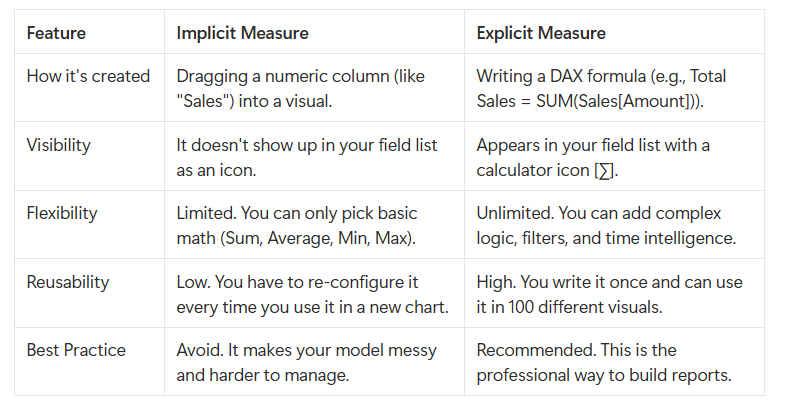
In the Data pane, explicit measures are shown with the calculator icon, on the other hand implicit measures in the Data pane shown with the sigma symbol (∑).
📌Implicit vs. Explicit Measures Explained
🧩 Write simple DAX formula.
DAX formula begins with equals symbol (=), The result is either a table object or a scalar value (single value). Function names must be followed by parentheses( ). Within the parentheses( ), variables are passed in.
Formulas can only refer to three types of model objects: tables, columns, or measures.
✍️ Column references
The column name must be enclosed within square brackets. Example — “Revenue = SUM([Sales Amount])”
Additionally, the column reference can proceed it with its table name. Outside square bracket is table name. Example — “Revenue = SUM(Sales[Sales Amount])”
✍️ Measure references
To perform quick aggregate, column names need to be in square brackets. Example — “Profit = [Revenue] – [Cost]”
✍️ DAX variables
To store results and describe How and when to use DAX variables in the module.
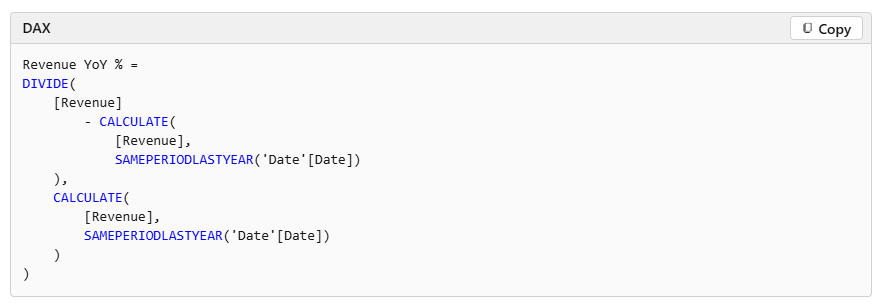
Example — the same measure definition but now formatted, which helps make it easier to read and understand by press Shift+Enter.
🧩 DAX data types
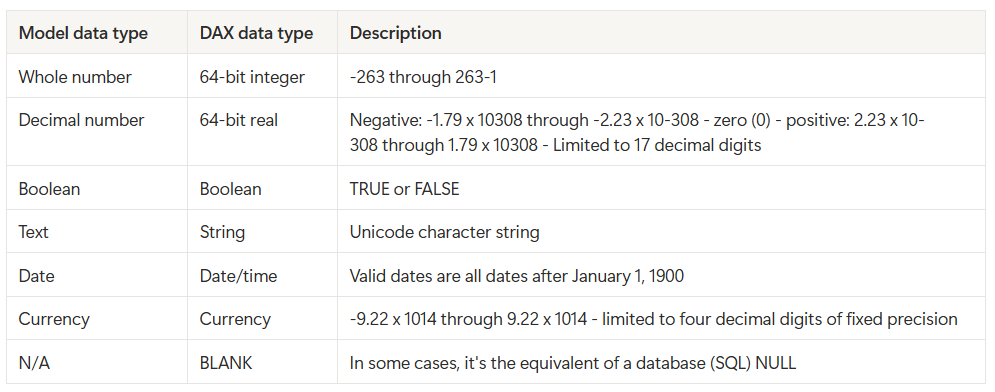
NOTE ! — DAX functions are related to the BLANK data type:
📖 BLANK( ) function returns BLANK 📖 ISBLANK(<value>) function tests whether an expression evaluates to BLANK.
📌📌 Remembering how BLANK is handled can be challenging, especially for DAX beginners. We recommend that you test your formulas thoroughly. 📌📌
🧩 Work with DAX function
The library of DAX function consists more that 100 functions to accomplish the goals. Original DAX was in Excel Power Pivot so, we can find over 80 functions that similar to Power BI functions
Here is the type of function that not exist in Excel specific to data modeling
- Relationship navigation functions
- Filter context modification functions
- Iterator functions
- Time intelligence functions
- Path functions
The useful function that we maybe familiar with, it’s IF() tests whether a condition that’s provided as the first argument is met. It returns one value if the condition is TRUE and returns the other value if the condition is FALSE.
📖 The function’s syntax is: IF(<logical_test>, <value_if_true>[, <value_if_false>])
More detail : https://learn.microsoft.com/en-us/dax/dax-function-reference
🧩 DAX operators
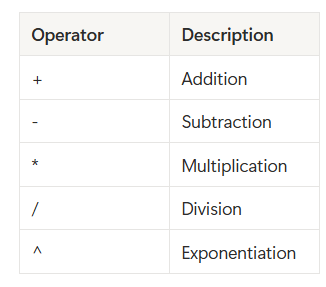
Using for create expression that perform arithmetic calculations, compare values, work with strings, or test conditions.
✍️ Arithmetic operators
✍️ Comparison operators
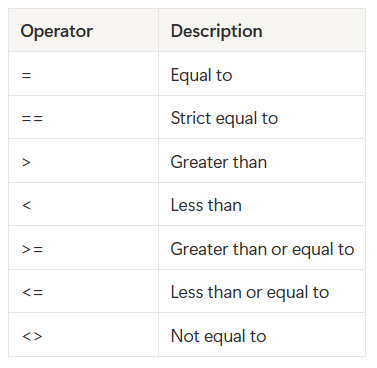
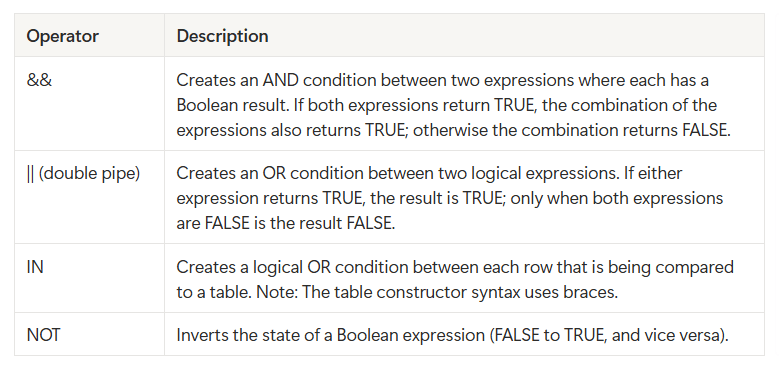
✍️ Logical operators
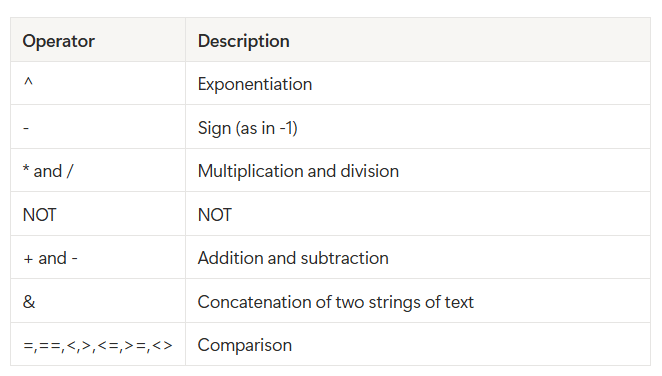
✍️ Operator precedence — When your DAX formula includes multiple operators, DAX uses rules to determine the evaluation order.
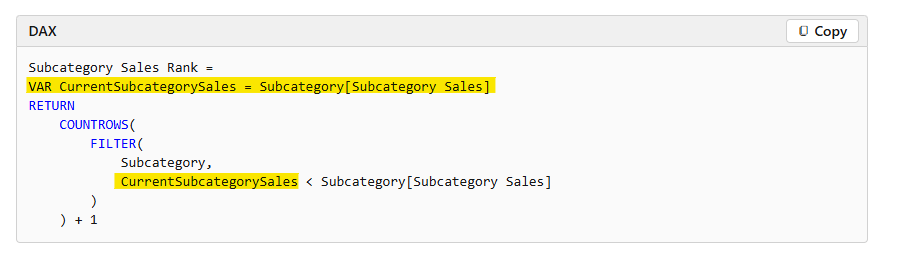
🧩 DAX variables
To declare DAX variables in your formula expressions. When you declare at least one variable, a RETURN clause is used to define the expression, which then refers to the variables.
Benefits:
- They improve the readability and maintenance of your formulas.
- They improve performance because variables are evaluated once and only when or if they’re needed.
- They allow (at design time) straightforward testing of a complex formula by returning the variable of interest.
End of the simple guild to write DAX.
Next week , let’s start to crate the DAX in sematic models 😆
Roadmap to PL-300 cert still going till reach there. 🖤
 Home Page
Leave a comment